How do contractors get paid for their work? In the world of construction, it means submitting pay apps. A pay application—pay app for short—is a document that outlines how a contractor will be paid.
In the US, AIA billing like a G702 or G703 is the most common form to use for pay apps. The work needed to fill one out can be exhaustive and complicated. They usually include an overview of the project’s status, a list of subcontractors, and the project schedule.
So how can a 3D site survey and analytics software like Propeller help project managers fill out pay apps faster?

It’s simple. Surveying your worksite regularly means you have 3D models of progress going back in time to the first drone survey.
This log can provide proof of work completed, along with related quantities. And because it’s all housed in one place, you have an accessible source of truth right on your browser.
Quickly track progress of work towards design
Depending on what region you’re in and what your specific contract says, you might start your billing cycle at 30, 90, or even 120 days after work begins.
3D site models are excellent for recordkeeping. You can see the site as it stood in the past and compare conditions and quantities from past dates. Moreover, the measurement and reporting tools mean you can see how you’ve progressed towards design.
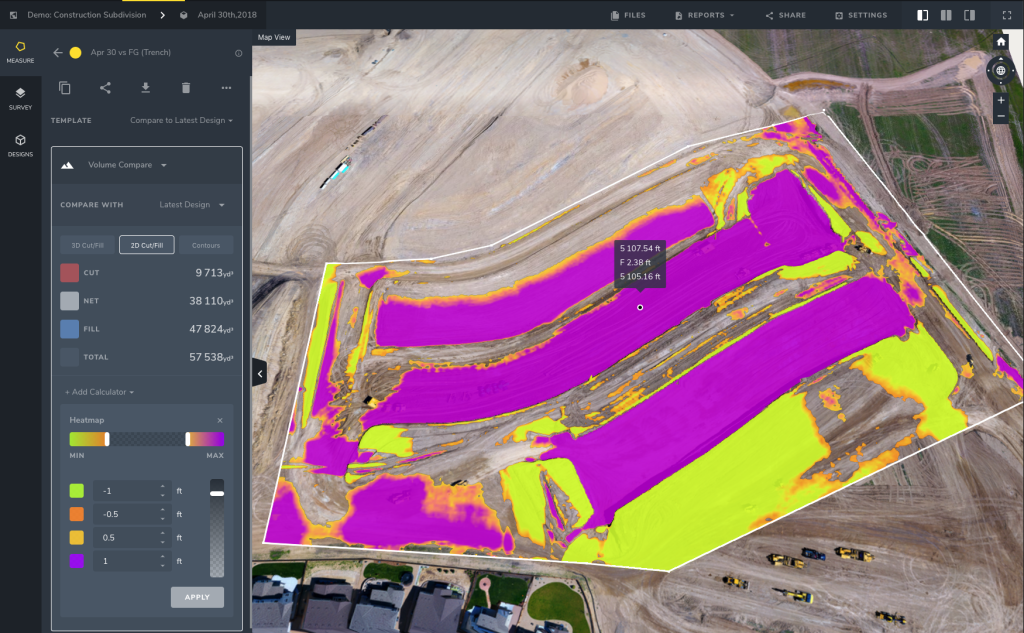
With on-screen calculators and easy design uploads, measuring how close your are to design and how much further you have left to go takes only a few clicks.
Jobsite timelines give a quick look at progress to date
Flying regular drone surveys of your jobsite record its progress. A timeline of the compiled survey images and data allow you to rewind and examine your jobsite as it was in the past.

This can be especially useful if you submit pay apps based on percentage of work done. Not only can you visually show the progress made on an entire site or project area, you can measure quantities for specific dates to prove your claims.
Measure earth moved with Propeller
Say you measure your earth movement by truck counts. This method is simple to understand and to calculate. Each truck holds a certain amount of material, so multiply that by the number of trucks and you have your earth moved.
But what if those trucks aren’t full?
Propeller’s built-in volume measurement tools and calculators let PMs find how much earth has been moved and track quantities over time. Measure how much earth has been moved at the source and cut out the possible errors made when material gets to a truck.

Tighter numbers in this stage mean better planning. (No one wants to get stuck having to tack on an extra day to move dirt thanks to underfilled trucks.)
Correct forecasting makes the whole project run smoother—including submitting pay apps on time. And because you’ve tracked cubes moved accurately, you can be confident in the quantities submitted in your pay app.
Backing up your numbers with rock-solid data
Aside from the time-consuming, but necessary process of putting together your pay apps, disputes can drag things out even further. But with Propeller, not only do you have comprehensive visuals of your jobsite over time, but you have accurate survey data backing up your numbers.
That log of actual site conditions can serve as a valuable insurance policy. If you need to prove the numbers quoted in your pay app, not only can you provide that evidence, you can access it quickly and easily from your browser. No need to wait on paperwork.
In fact, some customers we’ve spoken with attach Propeller’s PDF or CSV reports to their pay apps as extra documentation from the get-go.
Any way you do it, Propeller gives you a reliable method to track work completed and back up your claims, all from your device.