Introducing workspaces: Keeping your worksite data organized and under control
Today’s worksites are busy places. Without some serious organization, things can get messy fast. Project and survey managers can struggle to keep track of the sheer volume of design and measurement data, not to mention ensuring that it all makes its way into the right hands.
If you’ve ever found yourself lost in a sea of measurements and designs or struggled to coordinate teams on a complex project, you’ve probably longed for a few extra tools to help you and your teams stay organized, focused, and on track.
That’s why we’re so excited to announce our latest feature: Workspaces, a new way to organize your design and measurement files (and folders), helping you to increase productivity and minimize opportunities for error.
What workspaces means for you: By sorting design files and measurements (and folders) into different workspaces, you and your team can stay focused and get answers faster. Imagine putting items in a dedicated space for a specific team (for example, a safety team) or having a dedicated workspace for your most critical design files.
Without any further ado, let’s explore how workspaces can work for you (and why you’ll love it).
Cut through the clutter with organized survey data
Workspaces is about reducing the confusion that can occur when you have lots of designs and measurements to keep track of.
Imagine your current data structure is like piles of books sitting on the floor, without bookshelves to display them and make them easy to find. You may have all the data you need, but you’ll likely spend valuable time searching for it without a clear structure.
Think of workspaces as being like bookshelves that bring a layer of organization to your site data. If design and measurement files are like books, workspaces is the set of bookshelves that makes them easy to find. No more searching through all your site data for what you need—just go straight to your bookshelf.
How do workspaces work?
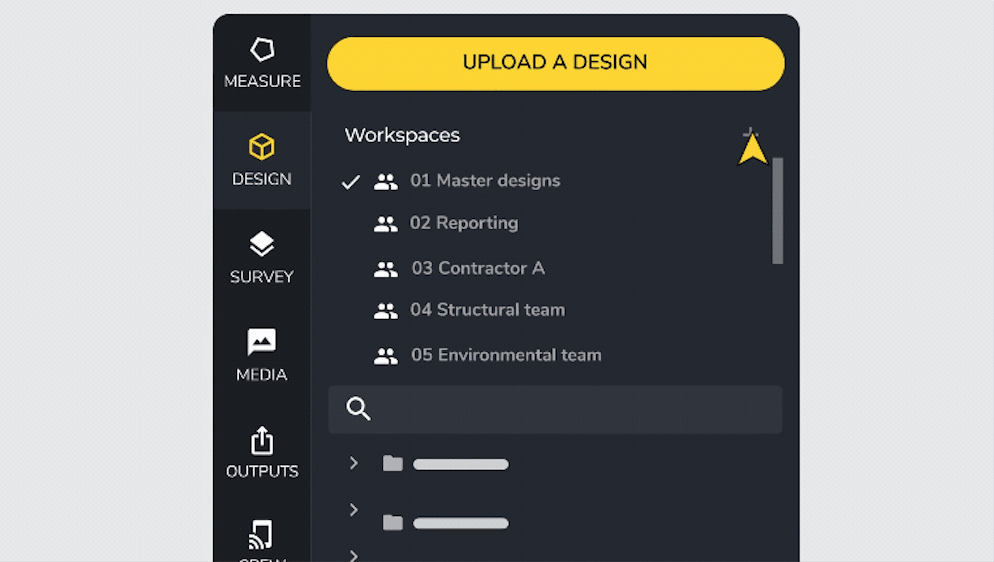
When you log into Propeller, you’ll see a new workspaces panel when you click the Measurements or Designs tab. Here, you can create and name specific workspaces for your worksite. You can then pull existing measurements and designs into your new workspaces via drag-and-drop.

Using workspaces, you can:
- Drag and drop design and measurement files into workspaces to give teams a less cluttered view.
- Multi-select measurement files to move several at once.
- Sort your list of files and folders alphabetically, by recently created, or recently updated.
- Filter files and folders by “created by me,” “created in the last seven days,” “converted designs,” or “site-level.”
- Share designs and measurements between workspaces.
- Move folders from one workspace to another.
Sharing simplified: Using data across workspaces
Need a design or more than one workspace? We’ve got you covered.
You can now link Design files to multiple workspaces. Imagine a single copy of a book that sits on multiple bookshelves for easy access.
Linked designs work exactly as they would if they “lived” in your workspace. For example, you might create a workspace called “Master Designs” for your most critical design files, then link those designs to other workspaces to ensure everyone uses the correct files. Changes to master design files therefore apply everywhere, keeping version control in check.
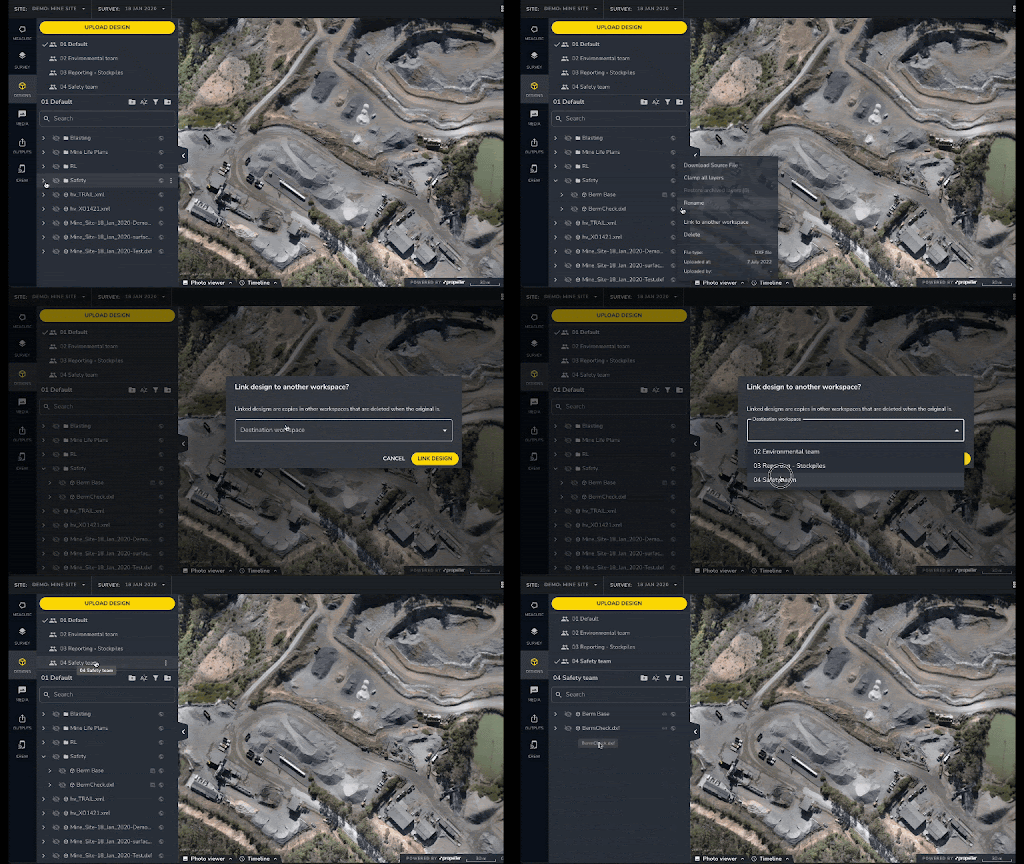
Learn more about linking designs in our Help Center article
Measurement files can only exist in one workspace at a time—and can be easily duplicated for use in every workspace that needs them.
How to use workspaces
Create a new workspace for your teams
Project managers work with lots of different teams, especially on large and complex project sites. With workspaces, you can create separate spaces for each of those teams (e.g., one space each for your structural, environmental, or safety teams).
Giving teams quick access to the files they need helps ensure consistent focus and productivity while reducing the risk of error. You can even create a workspace for yourself to keep your work on track.

Create a workspace for reports
Big projects can quickly get out of control. With so many datasets to sort through, finding the right files to use in reporting can feel like a game of Where’s Waldo? (also known as Where’s Wally? outside of the US).
Now, you can use workspaces to organize data for various reports. For instance, you might create a workspace just for stockpile inventory reports, making report generation a breeze.
Create a workspace for master designs
Projects often have a set of master designs that project and survey managers need to refer to regularly. You can use workspaces to create an easy-to-manage space for your master designs and link those designs to other workspaces to keep everyone up-to-date.
Create a workspace for subcontractors
If you have subcontractors doing specific earthworks on-site, you might create a workspace just for them. That way, you know exactly where to find the measurements you need for material volume calculations to determine contract conformance and payment.
Want to dig deeper? Check out our Help Center article on workspaces.
Amplify your productivity with workspaces
Propeller is where collaboration happens—and all that teamwork just got an upgrade. With better-controlled and organized data, your projects stay focused, productive, and on track.
Ready to get organized with workspaces? Request a demo today.