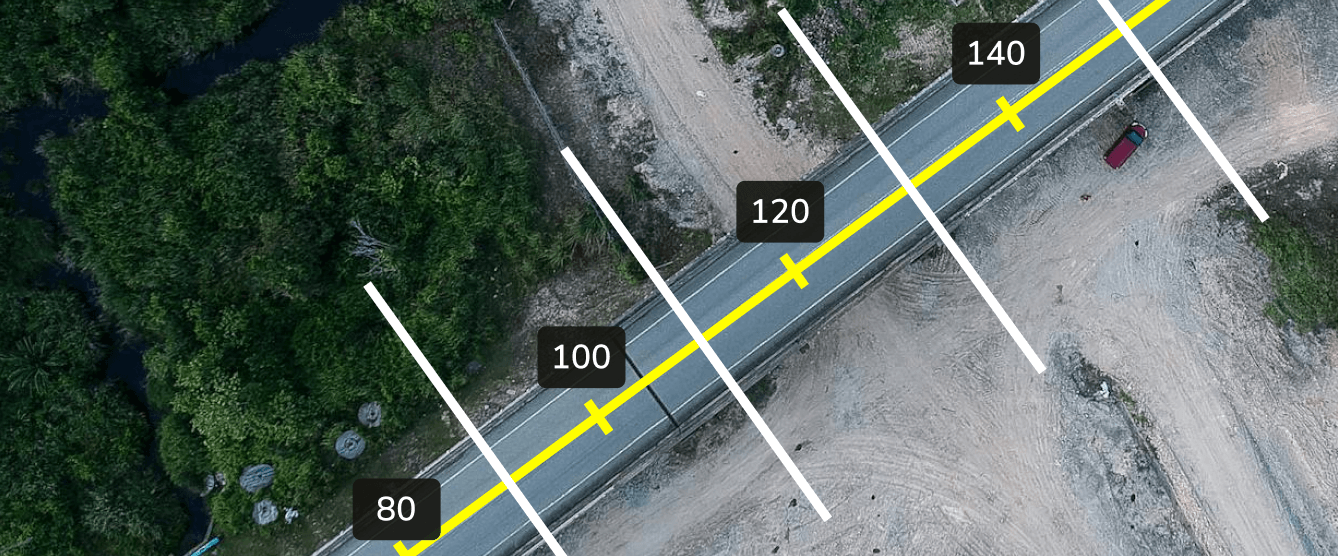
Alignments simplify communication and collaboration across project teams. Propeller brings them to life on your site map, giving project teams the tools to manage linear infrastructure projects more efficiently.
With comprehensive support for features like bulk cross-section creation and measurements, detailed positional referencing, and one-click reporting, Propeller is transforming how construction professionals use survey data.
Introducing Alignments and Stationing for your construction projects

Propeller brings alignments to desktop and mobile devices by:
- Enabling XML file uploads, with the ability to toggle multiple alignments on or off
- Integrating station and offset reference functionality to locate precise positions
- Digital stationing via Propeller Mobile for in-field users to more easily locate and inspect while on-site
- Generating individual or bulk cross-sections along an alignment with customizable parameters such as spacing intervals and offsets
- Supporting bulk cross-section measurements for simplified progress tracking and subcontractor management
Including point-of-interest (POI) referencing, making it easy to find precise alignment positioning for any feature.
[Alignments] will be a powerful tool for our Propeller Mobile users who are in the field and need real time location information.
– Roland Wallace, Survey Manager at Sigfusson Northern
Measuring and managing linear projects from one map just got easier.
In this post, we’ll recap some alignment file basics and explain why they’re such an integral part of linear project work for departments of transportation and civil contractors.
We’ll also show you how alignments work in Propeller, whether you’re in the office or in the field.

What are alignments?
In civil construction, alignments are the digital blueprint that lays out the location of a linear project. Roads, railways, pipelines, canals, and other linear infrastructure all rely on alignments to define their centerline and provide a reference for planning, construction, and ongoing maintenance.
For example, in a road, the horizontal alignment forms the centerline of a road, which curves left and right as it winds along the earth’s surface, while vertical alignments show how a road moves up and down as it changes elevation.

To build a road or any other linear project, we need to accurately locate the points of the centerline, both in design files and on the ground. Now, that’s where alignments come in.
Alignments are critical to large linear projects for several reasons:
- Planning and design: Alignments visually represent the project’s layout, enabling engineers to plan drainage, grading, intersections, and other project elements.
- Construction guidance: Alignments also guide construction equipment during excavation, embankment building, and pipe laying.
- Quantity calculations: When the alignment is clear, engineers can calculate the volume of materials needed for construction, including earthwork volumes and paving materials.
Stations, offsets, and how alignments are used
Historically, LandXML workflows have faced limitations in 3D drone mapping applications. Without alignments, a tool cannot speak the fundamental “location” language on linear projects.
While alignments show the centerline of a road, stations, and offsets function as a type of location reference system, helping to pinpoint the precise location of any feature relative to that center line.
- Stations: Stations (or chainages) are like mile markers along a road. Typically measured in meters, feet, or yards, stations start from a defined reference point (usually the beginning of the alignment) and increase sequentially along its path
- Offsets: Offsets represent the perpendicular distance from a specific station on the alignment to another point of interest, such as a stockpile

Stations and offsets will help pinpoint any desired location relative to the alignment when used together.
For example, civil engineers use stations and offsets to define the location of design elements like sidewalks or drainage pipes along a road’s centerline. During construction, surveyors use them to mark locations for various features, and engineers use them to calculate material volumes.
Cross-sections add another layer of precision. These are perpendicular “slices” of terrain at specified intervals along an alignment, showing details like elevations from the centerline, ditch flow lines, and comparisons to design surfaces.
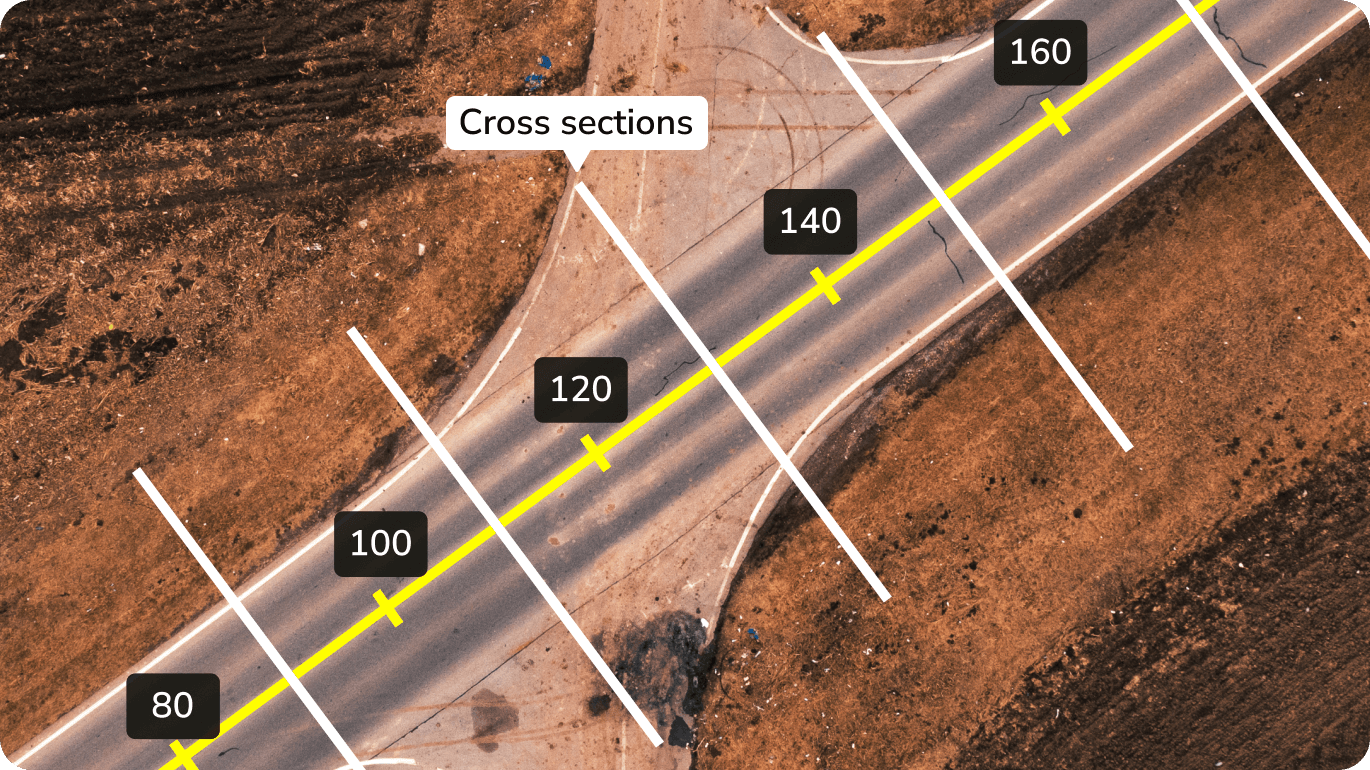
TL;DR: Alignments, stations, and offsets are the language of locations for managing linear projects, so they’re a must-have on a 3D map everyone can use, wherever they are.
How Propeller supports alignments in the office and the field
With Propeller, you can reference alignments and stations from one central map, whether in the office or on-site.
View multiple alignments and collect positional data with the same point-and-click ease you use to make measurements. Better still, you can do it all on the same map you use for volume calculations, quick site checks, and progress reporting.

Here’s what you can do with alignments in Propeller:
-
- Upload LandXML files to view alignments on your survey map in rich detail
- Toggle alignments on or off to view stations and the centerline on your 3D map
- Get positional referencing data: As you pan around the map with your cursor, you’ll see the specific station and offset of the cursor relative to the alignment, helping you reference the exact location of a stockpile or other points of interest on your map
- View multiple alignments on one map. Simply click an alignment to activate for positional referencing
- Use alignments on-site with Propeller’s mobile app. With a shared source of truth in the palm of your hand, you’ll get the same accurate positional data whether you’re on-site or at your desk
- Generate cross-sections. Compare customizable cross-sections to previous surveys or design files to track progress, verify quantities, and forecast material requirements
- View precise POI positions. Drop a point anywhere on your map and instantly reference its alignment, station, and offset for precise location tracking
Share reporting. Download and share cross-section reporting in PDF or CSV formats for dirt-simple sharing and collaboration.
I did a drone demo last week and showed [alignments] to a bunch of colleagues. Stations and offsets was like a mic drop. This is one of the better things I’ve seen in a long time.

Want to learn more? Check out our knowledge base for a deeper dive.
Don’t get your lines crossed
We know how much project teams rely on clear, centralized communication to build the pathways that connect our world. Our in-app alignment support is one more tool to help simplify communication and collaboration at scale across your sites.
Whether you can count your team on one hand or need a small stadium to get your crew together, Propeller has you covered.