Over the last three years, Propeller’s partnership with Trimble, the global leader in positioning technologies, has helped heavy civil companies integrate actionable drone surveying into their earthwork operations.
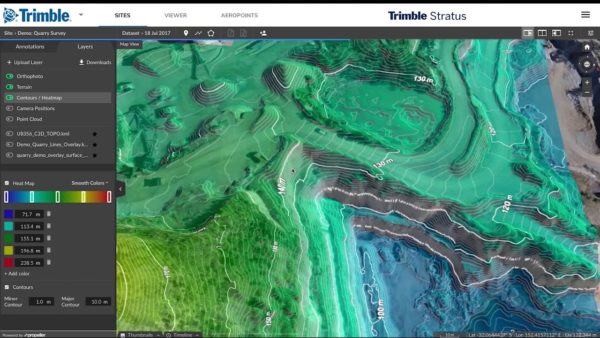
Trimble and Propeller’s biggest collaboration has been Trimble Stratus. It’s a version of Propeller’s drone survey visualization and analysis platform optimized to seamlessly integrate with Trimble’s other GPS and surveying software offerings.
Trimble Stratus makes it easy for surveying professionals to collect, process, map, and measure drone surveys of their sites. Platform users benefit from a suite of industry-optimized measurement tools. These tools allow them to perform stockpile measurements, cut/fills, and compare current progress to design all in the same platform.
We know how important it is for surveying professionals in the heavy civil industry to have an interoperable tech stack. Being able to easily take data from one platform and use it in another makes every aspect of your job (conformance checks, modeling, machine control, etc.) simpler.
That’s why we made the process for exporting all sorts of drone survey deliverables from Trimble Stratus to use in Trimble Business Center (TBC) pretty straightforward. We do. We do.
Looking to check out Trimble Business Center? You can download it here.
Below are some common integrations you’ll deal with if working with both Trimble Stratus and Business Center. (If you’re a current customer and have a question about a more specialized compatibility issue, reach out to your customer success engineer. Or, check out our help center.
TTM compatibility
Trimble Stratus is fully compatible with TTM files. The platform directly accepts TTMs and you can export your drone surface into a TTM as well.
This makes exporting your data into TBC and other platforms a snap. You can use that drone surface to fill in the gaps of data for machine control. Or, you can use it on your rovers with a visual display to ensure things are going to spec.
See how Sunesis Construction uses Trimble Stratus and TBC in collaboration to track volumes, create models, and provide clients with accurate bids.
Croppable TTM files
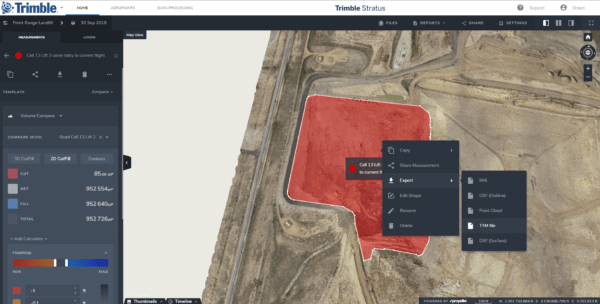
A related TTM feature is the ability to crop specific parts of your 3D site survey into individual TTM files.
This is useful if you only need to use one part of the terrain. It’s also helpful if you need a smaller file for focused day-to-day work. Doing so is easy. Just draw a boundary around the area of interest and click Export and TTM File.
Using Trimble .JXLs without converting
The second big area of compatibility between Trimble Stratus and Trimble Business Center is .JXL support.
You don’t need to shift, scale, or rotate data after you import a .JXL. Local calibrations are compatible from the get go. This means the datasets you produce when flying your site are compatible with TBC.
Push data directly to Trimble Connect
Lastly, the data you capture can be pushed from Stratus directly to Trimble Connect, Trimble’s open collaboration platform.
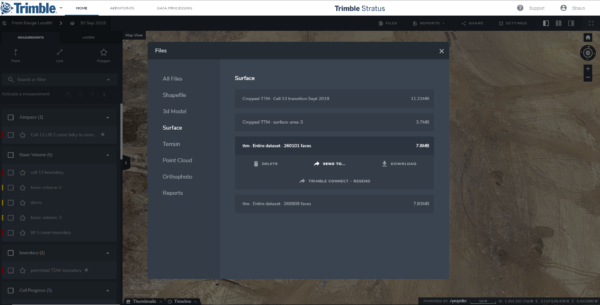
You can send data fast, and someone on the Trimble Connect side can download that data for their equipment without ever logging into Trimble Stratus. It’s just a matter of a few clicks.