DJI Dock + Propeller
Get daily quantities automatically
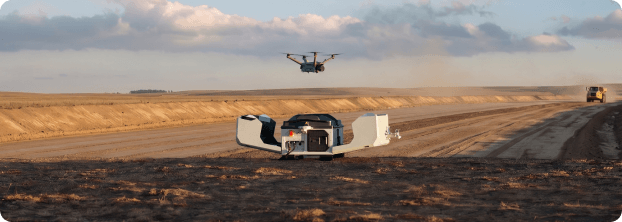
On sites that move every day, fitting flights around the schedule means your data is already a step behind. DJI Dock + Propeller captures your site automatically and syncs it straight into Propeller, so the field and office are always working from what’s actually there.
Talk to an expert
The problem
When capture only happens weekly, a lot can change before the next flight. Teams start second-guessing progress, issues compound, and decisions slow down waiting for fresher data.
DJI Dock + Propeller closes that gap, so teams can work from current site data instead of guessing what changed.
What it is
Scheduled capture that flows into Propeller.
Set a schedule, and DJI Dock handles the rest.
Flights via DJI Dock 2 or DJI Dock 3 process and sync directly into Propeller, no manual uploads, no pilot to track down.
The result: field and office teams working from the same current site data, without the back-and-forth.
For RTK workflows, you can count on consistently repeatable results, often in the 3–5 cm range, depending on site conditions and setup.
Why teams use DJI Dock + Propeller
More frequent capture. A lot less coordination.
For busy sites, DJI Dock keeps capture consistent and running without adding to anyone’s workload.
01
Fly more often without the hassle.
Get daily or near-daily coverage without scheduling a pilot every time.
02
See your site as progress is made.
Fresher data means catching issues earlier and confirming progress between milestones, without waiting on the next flight.
03
Save time with automated transfer + processing.
Once the flight is done, data flows straight into Propeller. No manual uploads, no extra steps.
04
One integration for both docks.
The same Propeller workflow supports DJI Dock 2 and DJI Dock 3, so teams aren’t locked to a specific dock generation.
Designed for the sites that need it most
Scale capture without pulling people off operations.
DJI Dock makes consistent capture practical for fixed, high-activity sites, without adding to your team’s workload.
01
Long-term, high-activity sites
For sites moving faster than weekly capture can keep up, DJI Dock keeps visibility current.
02
Fixed locations
Where a dock stays deployed, you get consistent, repeatable coverage without anyone having to show up to fly.
03
Consistent visibility
Help teams stay aligned without pulling people away from day-to-day operations.
Use case
Daily progress scans
Give stakeholders a current read on site progress between major milestones, without the guesswork.
Use case
Stockpile tracking
Support higher-cadence quantity tracking without adding manual upload steps.
Beta release
What to expect
Currently in open beta: RTK only, no PPK. Dock-to-site mapping is set up with Propeller support.
How it works
From autonomous flight to shared site reality.
Step 1
Dock captures the site
DJI Dock launches and charges the drone autonomously.
Step 2
Auto syncs to Propeller
Propeller ingests the flight, stitches multi-leg missions, and processes the data.
Step 3
Review results in Propeller
Current site data is ready in Propeller. No manual effort, no extra coordination.
DJI Dock + Propeller
Get daily quantities automatically
On sites that move every day, fitting flights around the schedule means your data is already a step behind. DJI Dock + Propeller captures your site automatically and syncs it straight into Propeller, so the field and office are always working from what’s actually there.
Talk to an expert
The problem
When capture only happens weekly, a lot can change before the next flight. Teams start second-guessing progress, issues compound, and decisions slow down waiting for fresher data.
DJI Dock + Propeller closes that gap, so teams can work from current site data instead of guessing what changed.
What it is
Scheduled capture that flows into Propeller.
Set a schedule, and DJI Dock handles the rest.
Flights via DJI Dock 2 or DJI Dock 3 process and sync directly into Propeller, no manual uploads, no pilot to track down.
The result: field and office teams working from the same current site data, without the back-and-forth.
For RTK workflows, you can count on consistently repeatable results, often in the 3–5 cm range, depending on site conditions and setup.
Why teams use DJI Dock + Propeller
More frequent capture. A lot less coordination.
For busy sites, DJI Dock keeps capture consistent and running without adding to anyone’s workload.
01
Fly more often without the hassle.
Get daily or near-daily coverage without scheduling a pilot every time.
02
See your site as progress is made.
Fresher data means catching issues earlier and confirming progress between milestones, without waiting on the next flight.
03
Save time with automated transfer + processing.
Once the flight is done, data flows straight into Propeller. No manual uploads, no extra steps.
04
One integration for both docks.
The same Propeller workflow supports DJI Dock 2 and DJI Dock 3, so teams aren’t locked to a specific dock generation.
Designed for the sites that need it most
Scale capture without pulling people off operations.
DJI Dock makes consistent capture practical for fixed, high-activity sites, without adding to your team’s workload.
01
Long-term, high-activity sites
For sites moving faster than weekly capture can keep up, DJI Dock keeps visibility current.
02
Fixed locations
Where a dock stays deployed, you get consistent, repeatable coverage without anyone having to show up to fly.
03
Consistent visibility
Help teams stay aligned without pulling people away from day-to-day operations.
Use case
Daily progress scans
Give stakeholders a current read on site progress between major milestones, without the guesswork.
Use case
Stockpile tracking
Support higher-cadence quantity tracking without adding manual upload steps.
Beta release
What to expect
Currently in open beta: RTK only, no PPK. Dock-to-site mapping is set up with Propeller support.
How it works
From autonomous flight to shared site reality.
Step 1
Dock captures the site
DJI Dock flies, lands, charges, and uploads autonomously.
Step 2
Auto syncs to Propeller
Propeller ingests the flight, stitches multi-leg missions, and processes the data.
Step 3
Review results in Propeller
Current site data is ready in Propeller. No manual effort, no extra coordination.