Road design and planning is a juggling act. You’re balancing job requirements and physical limitations while keeping every other site operation moving at the same time.
Today, we’ll walk through some Propeller tools that make the road design process a whole lot easier.
Whether you’re planning a highway redevelopment or building a brand new road, earth movement is inevitable. You’re going to move dirt from one spot to another to fix the grade, and establish stable base layers to support the finished surface.
Cutting, excavating, and clearing all go faster with intuitive software that makes progress tracking a breeze.
At Propeller, we’ve made it our mission to build tools that let you spend less time learning the latest software, and more time doing the work that matters most.
Did you know?Drone photogrammetry brings value to 80% of the road design workflow: tracking progress, measuring stockpile quantities, and performing QA throughout subgrade development.
Here are seven road design tools that are sure to make your next project run like clockwork.
DXF uploads
Your original design is arguably the most essential piece of the roadwork puzzle. It’s the beacon that guides you back if development goes astray, and it’s how you track how far you’ve come and how far you have left to go.
Propeller customers upload their DXF files to keep them in check at every stage. As they flatten, cut, and add material, they pull up the DXF and lay it over their most recent flight to see progress.
When you’re working on a road that’s 15 miles (24km) long, you’re only ever interacting with a small section, which makes it easy to lose sight of the big picture. (Unless you’re using composite surveys, but more on that below.)
What you see in Propeller is quite literally the big picture, and it’s there whenever you need it. Blanket DXF files over your terrain to see the finished grade in 3D, or inspect your design from a bird’s-eye view at your exact elevation to avoid tunnel vision. See everything Propeller supports, now including LandXML.
Linework
We understand the limitations of photogrammetry during paving. You need accuracy tighter than 1/10 ft when you’re laying asphalt, and drones aren’t quite there yet.
Most drivers never give a thought to how a road gets designed, but the hardest part of a road job happens pre-paving.
More accurate, more frequent information about how the subgrade is progressing keeps your team informed, your client happy, and your regulations met.
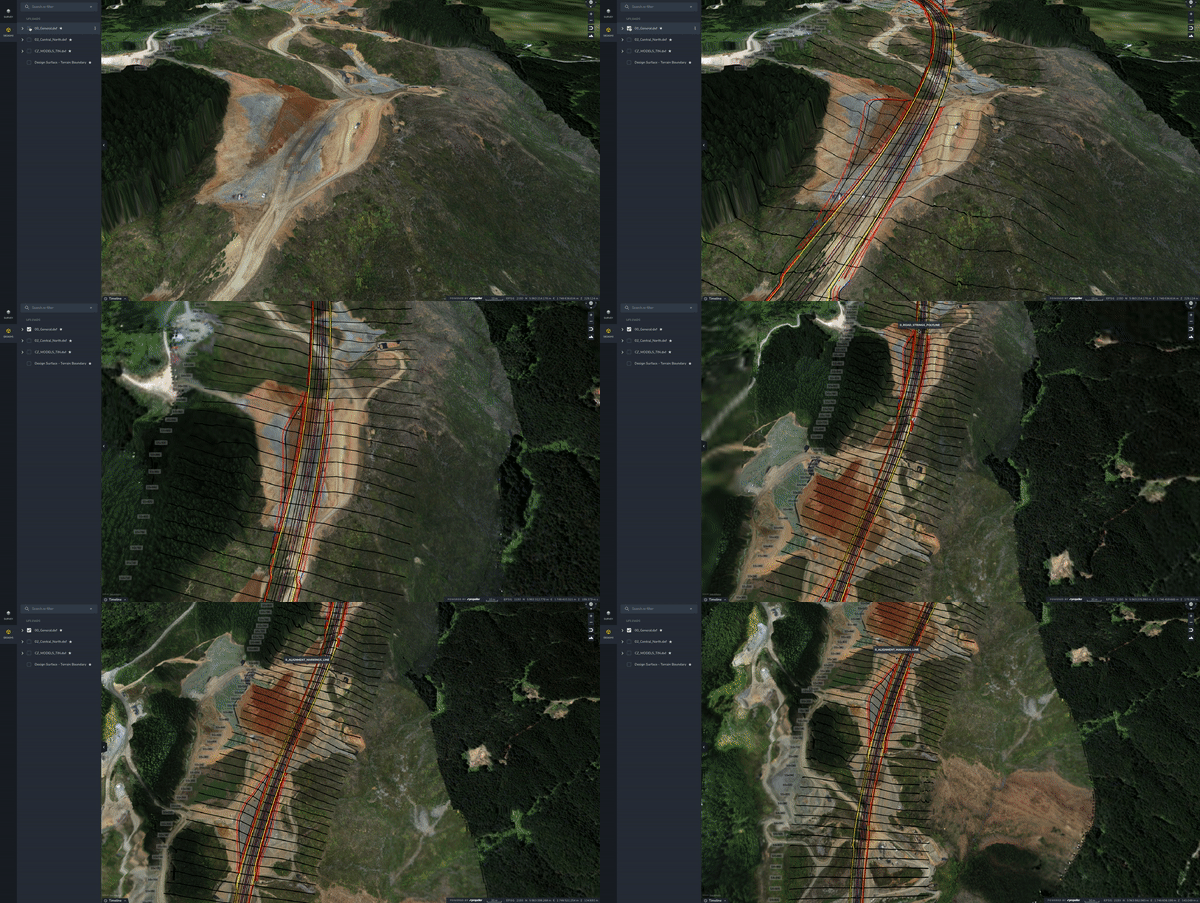
You can upload all your design files to Propeller, and you can also add linework over your survey images. A wireframe prevents arbitrary, one-off measurements and creates shared context, so everyone stays on the same page about where boundaries lie.
Most customers add linework every 30 to 65 feet (10 to 20m) so they can reference a particular section. There are plenty of useful boundaries beyond that too: center lines, alignment markings, and curvature are all things you can communicate through linework. The image above shows how linework appears in the Propeller platform, layered over a customer’s most recent survey imagery.
Cross-section comparisons
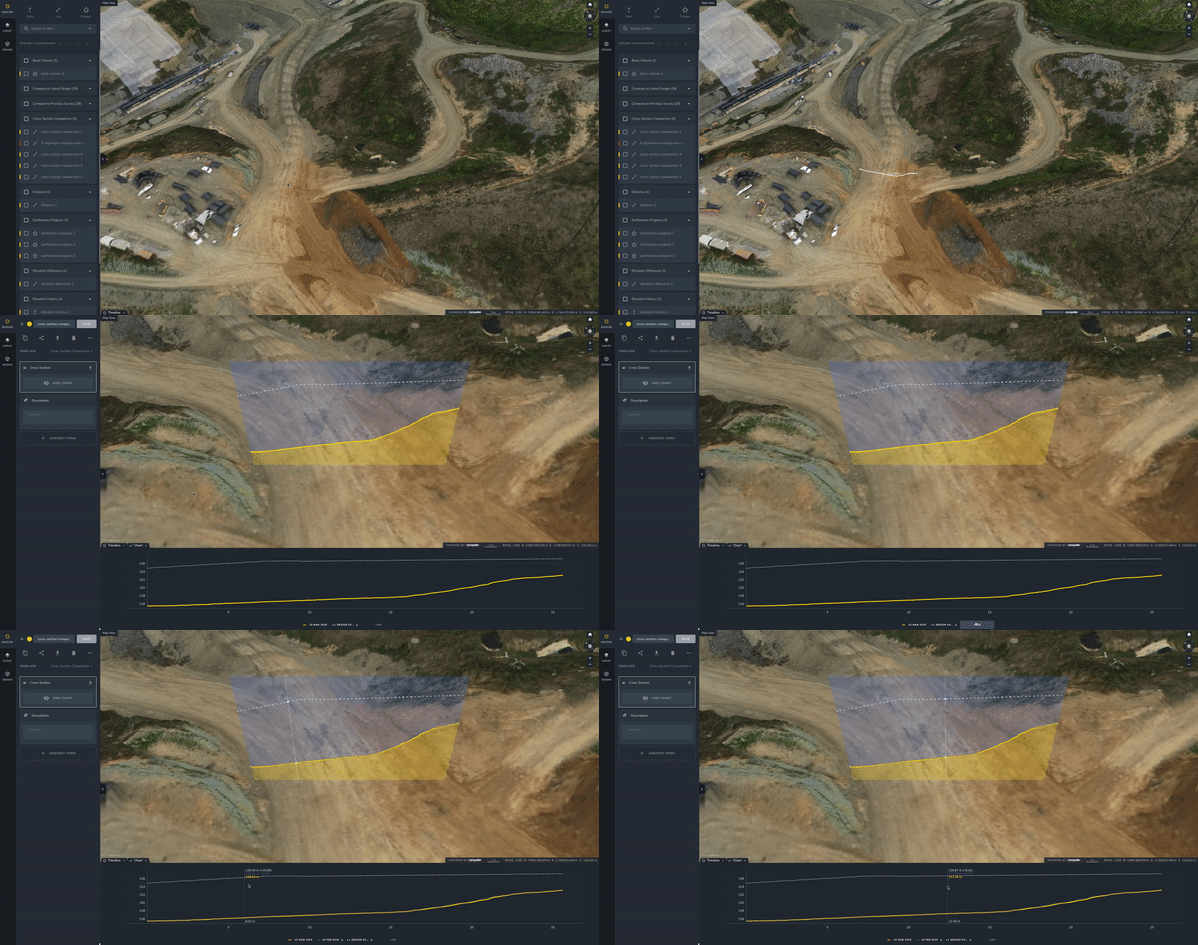
Viewing your site in 3D adds a layer of tangibility to an end goal that previously only lived in design documents, but on its own it doesn’t quantify the progress you’ve made.
That’s where cross-section comparisons come in. As the illustration shows, you take the cross-section tool, drag it across the section of road you want to examine, and the platform generates a grade spectrum with accurate metrics on how far you are from design.
Once you know your delta, you can go back and revise, bringing in more dirt or taking some away, whatever it takes to bring the grade up to design level.
For quick calculations, all linework converts to a measurement in a few clicks. When you’re ready to export, scroll through and check off the ones you want to report on, and the platform generates a progress report to share with everyone who needs it.
Reports are as specific as you need. Since linework breaks your project into subsections, you can compare one section to another with a single click.
Composite surveys
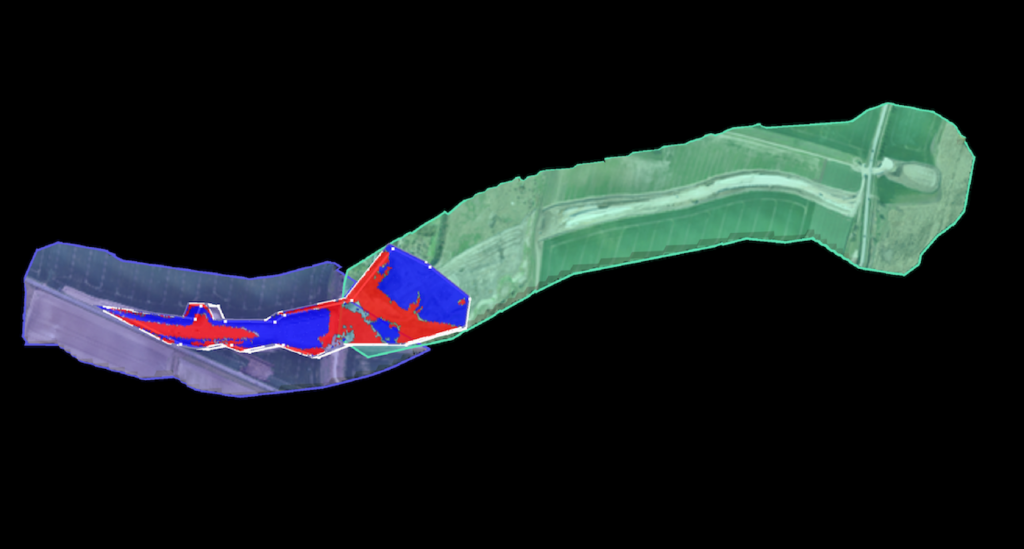
Composite surveys are essentially automated image stitching, a way to combine the most recent 3D survey images from small, active sections of a roadwork site into one meaningful whole. It’s the best way to get the full-site picture you need to make the right call for the project, without spending hours or even days re-surveying inactive sections or manually processing cumbersome datasets.
Road design projects are a common stumbling block. With traditional survey methods, the time sink makes regular surveying impossible.
With composite surveys, just upload and merge smaller sections to combine up to 25 surveys, as they change, into one seamless model of the entire site, no matter how large.
You can still measure and track progress against previous survey data and final grade across the whole site. Calculate material volumes, measure distance, compare surfaces to design, and document progress in a few clicks.
Line markers to polyline
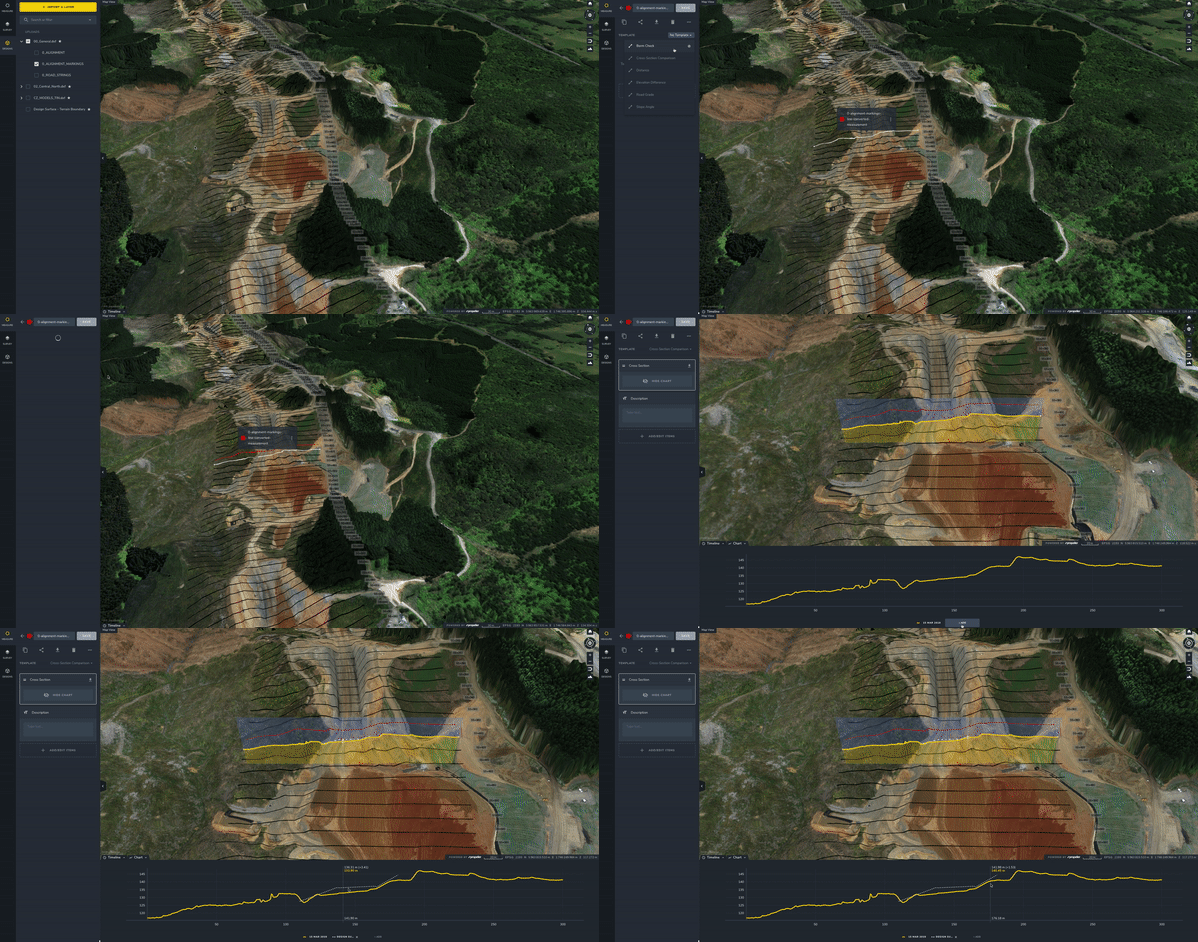
Propeller lets you convert line markers to polylines so your road design wireframe is more visually cohesive and easier to interpret. From there, you can add specific, polyline-based measurements to your toolkit.
Once you have a set of measurements that help you work more efficiently, you can save them and copy them onto each new dataset. That way, all your data stays up to date with your most recent flight.
Haul road analysis
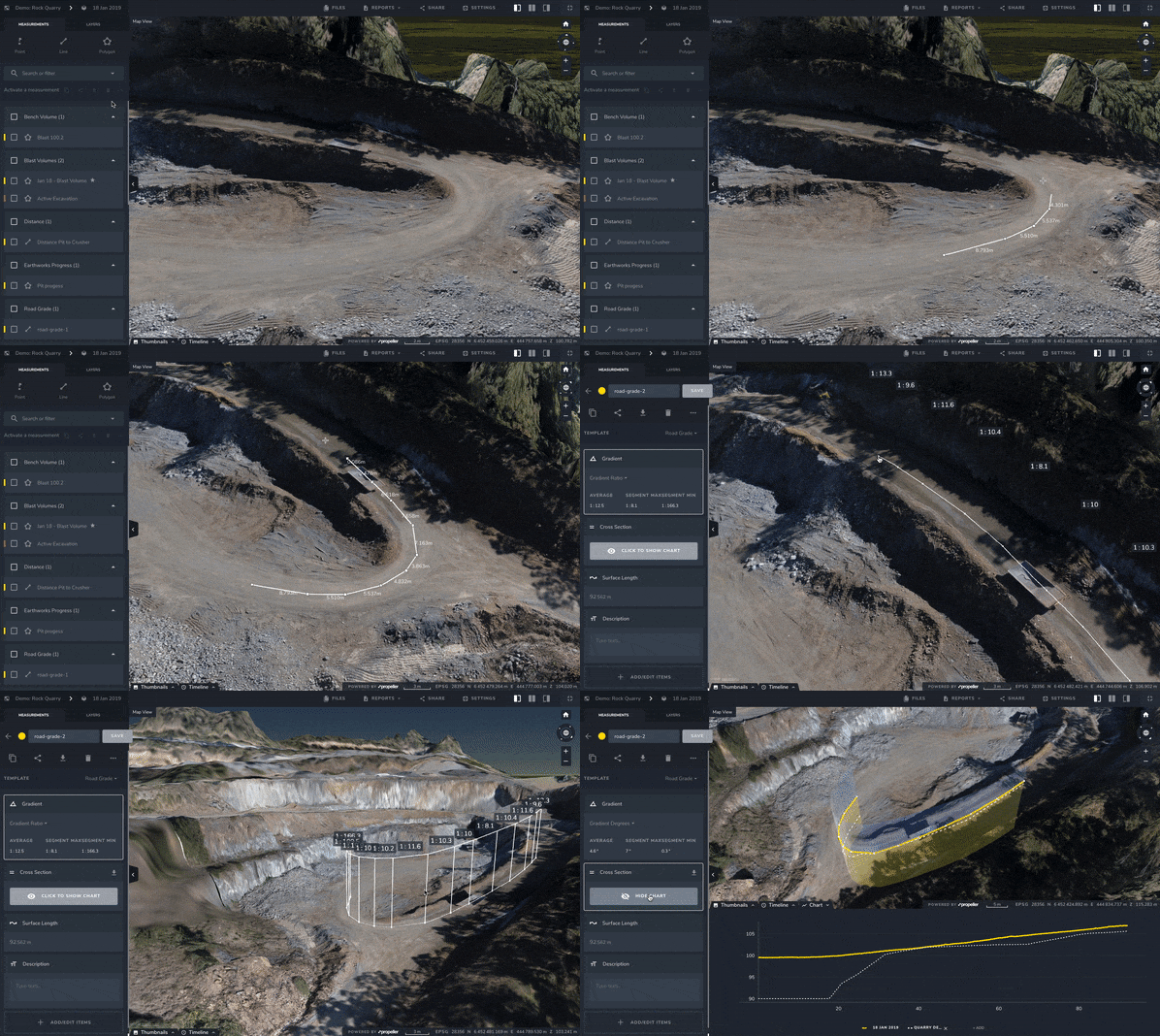
If you had to pick one road design tool that stands apart from the rest, it’d be this one.
Haul road analysis comes into play when you’re hauling heavy loads in and out all day, gravel, stone, waste, and the like, or when you’re frequently driving heavy equipment across a site.
All that traffic adds up to a hefty fuel cost, and most earthwork operations are keen to cut back.
With haul road analysis, road design teams of all kinds track slope to improve fuel efficiency.
The photogrammetry misconception in road design
With road jobs, photogrammetry is your insurance policy, a hard, transparent record of each project phase that keeps everyone doing the right things.
Propeller lets you track high-precision progress down to 1/10 ft and quickly make quantifiable observations about your material movement. These quantities keep your project moving and on schedule, all the way up to paving.
With 3D visuals of your site, you can manage everything up to subgrade the way you’ve always wished you could, with quick quantities to share with all the right people.
Curious about other ways contractors use Propeller for road development? Give this article a try, or see how real teams put these tools to work. The benefits extend well beyond these seven.